Table of Contents
When you are reading an article from Google Discover, Google wants you to use AI Mode. This works for any webpage you view in the Google Android app, not just from Discover.
Google is pushing AI Mode within Google Discover, with options to summarize, follow-up and dive deeper after you start reading a story from within the Google Discover feed. This is just one more avenue where Google is pushing its users into AI Mode.
To clarify, I am told this is not just Google Discover, but the Google App on Android, for any webpage you are looking at.
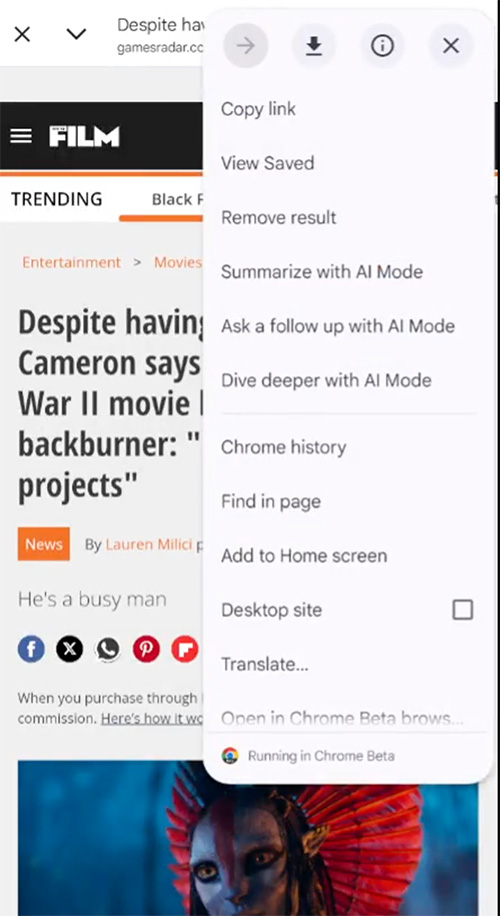
How it works. After you click into an article from the Google Discover feed, when you click on the three dots at the top right, there are options for:
- Summarize with Al Mode
- Ask a follow up with Al Mode
- Dive deeper with Al Mode
Damien (adell) on X posted a video, here is a screenshot from that video, followed by the video embed:
Why we care. If you don’t see the trend yet, Google continues to find ways to drive people into Google Discover. Google is taking users from Google Search, AI Overviews, people also ask, Chrome, the new search bar, and so on and pushing them into AI Mode.
In this case, Google already sent the user to your site, but after that, Google is giving users the ability to use AI Mode to get an AI version of your story.
If you liked the article, do not forget to share it with your friends. Follow us on Google News too, click on the star and choose us from your favorites.
If you want to read more like this article, you can visit our Technology category.