“#Enable New Start Menu in Windows 10 Version 2004 May 2020 Update”
Microsoft recently released the new Start Menu to Windows 10 version 2004 with a preview patch KB4568831. The latest patch version raises the OS version to Build 19042.423, and adds 20H2 features to May 2020 Update.
RECOMMENDED: Click here to fix Windows errors and optimize system performance
One of the is the new Start menu and a new Alt Tab experience that includes Edge open tabs as individual windows to directly switch to the desired tab.
The company describes the Start menu change as ‘a more streamlined design that removes the solid color backplates behind the logos in the apps list and applies a uniform, partially transparent background to the tiles. This design creates a beautiful stage for your apps, especially the Fluent Design icons for Office and Microsoft Edge, as well as the redesigned icons for built-in apps like Calculator, Mail, and Calendar that Microsoft started rolling out earlier this year’.
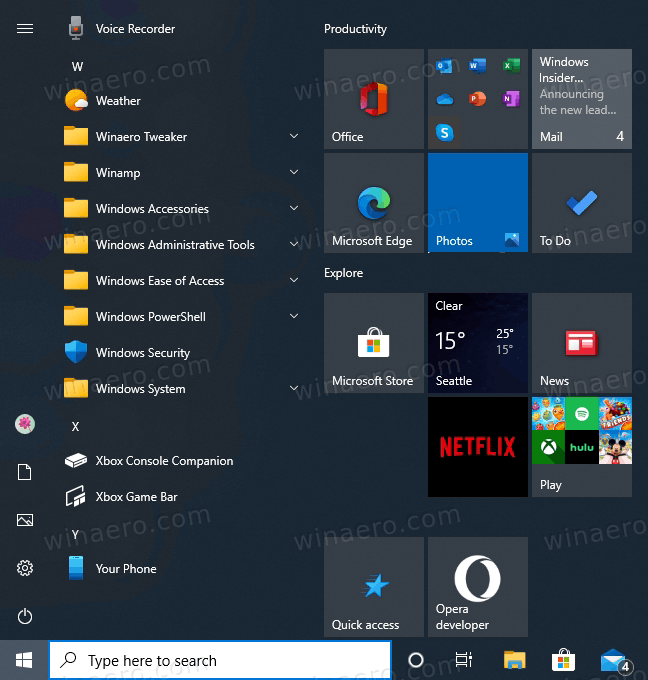
KB4568831 is an optional update available for Windows 10 version 2004, so it needs to be installed manually. However, even after installing the update you won’t receive the new Start menu and other 20H2 features. That’s because Microsoft is about to issue a special enablement package, similar to what we had with 19H1 and 19H2 releases of Windows 10. However, the package is not available as of now, and the features remain locked out of the box. Luckily, Windows Latest has discovered an easy method to enable the new Start menu and the new Alt Tab experience. All you need to do is to apply a Registry tweak, as follows.
- Open Settings .
- Navigate to Update & security > Windows Update > Check for updates > Optional updates and install Build 19041.423.
- Open the Registry Editor app.
- Go to the following Registry key.
HKEY_LOCAL_MACHINESYSTEMCurrentControlSetControlFeatureManagementOverrides2093230218. See how to go to a Registry key with one click. - On the right, modify or create a new 32-Bit DWORD value
EnabledState.
Note: Even if you are running 64-bit Windows you must still create a 32-bit DWORD value. - Set its value data to
2in decimals. - Again on the right, create a new 32-bit DWORD value
EnabledStateOptionsand leave its value data as0. - Restart Windows 10.
After the system reboot, you should now have the new Start menu.
RECOMMENDED: Click here to fix Windows errors and optimize system performance
If you want to read more like this article, you can visit our Technology category.
if you want to watch Movies or Tv Shows go to Dizi.BuradaBiliyorum.Com for forums sites go to Forum.BuradaBiliyorum.Com