Table of Contents
Your SEO tools already contain the answers. MCP makes it easier to ask questions your dashboards weren’t built to handle.
Model Context Protocol (MCP) makes it easier to work with the data already sitting inside your SEO and marketing tools. Instead of digging through reports, exporting data, and stitching spreadsheets together, you can ask an AI assistant questions that would otherwise take hours to answer.
That makes an MCP server useful for analysis that requires finding patterns across pages, keywords, traffic, rankings, and other data points.
Here’s how I’ve been using MCP servers to get more out of tools like Ahrefs, Google Analytics, and Google Search Console.
Using MCP to uncover what’s driving competitor growth
A few months ago, I set out to learn why a client’s competitor was growing so fast. Ahrefs showed me their winning pages and keywords, but not the underlying trend or how the pieces fit together.
- Had those pages climbed steadily for months or spiked suddenly?
- Did the growth track to a page type or subdirectory, or did the whole site benefit from an algorithm update?
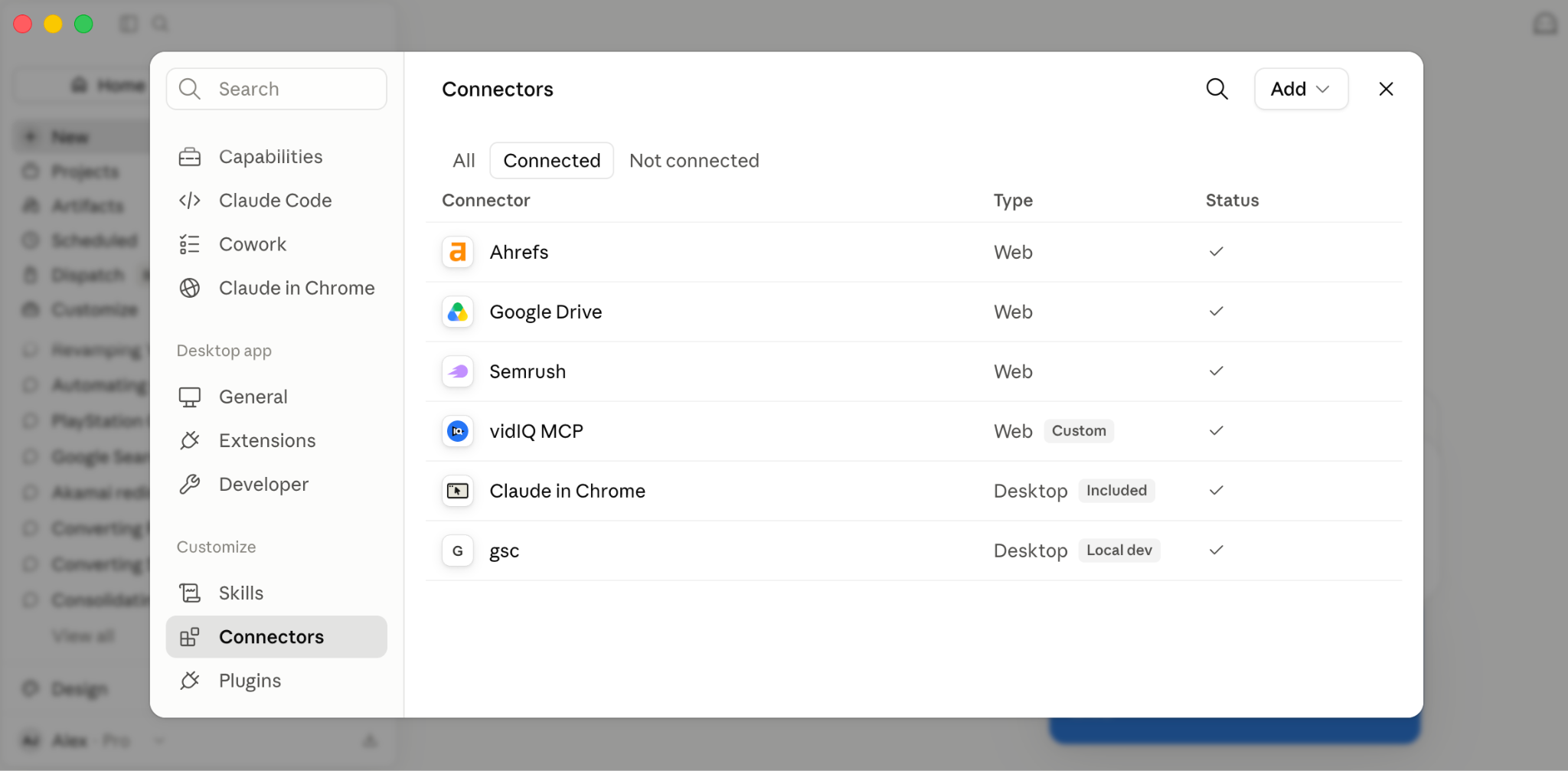
I connected Claude to the Ahrefs MCP server and asked it to dig in. Minutes later, I had a breakdown of which pages were new in the last six months, their estimated traffic, the keywords driving it, and how key pages had grown month over month.

Here’s what I learned about this competitor:
- They built a new section of their site with highly focused service pages.
- International content they’ve been building for the last three years started to take off.
- They flipped the switch on domain redirects for 10+ firms they acquired years ago.
Ahrefs doesn’t hide this data, but it’s scattered across reports and different filters. Normally, you’d export dozens of reports and combine the data with pivot tables. For monthly, weekly, or daily comparisons, that process is slow and frustrating.
MCP lets you pull and reshape data that already lives in the tools you pay for, but is a pain to reach through the normal interface. Developers who work with APIs won’t find this new. For everyone else, it opens up a whole new world of data analysis.
See where your brand appears in AI search, where competitors are winning, and what it takes to become the answer AI recommends.
How MCP connects AI to your tools
MCP is an open standard that lets AI assistants connect to external tools and data sources. Anthropic open-sourced it in November 2024, and support has since expanded across major AI platforms.
An MCP server connects an AI assistant to a specific tool or service, letting you query its data in plain language. For example, Semrush offers several MCP servers.
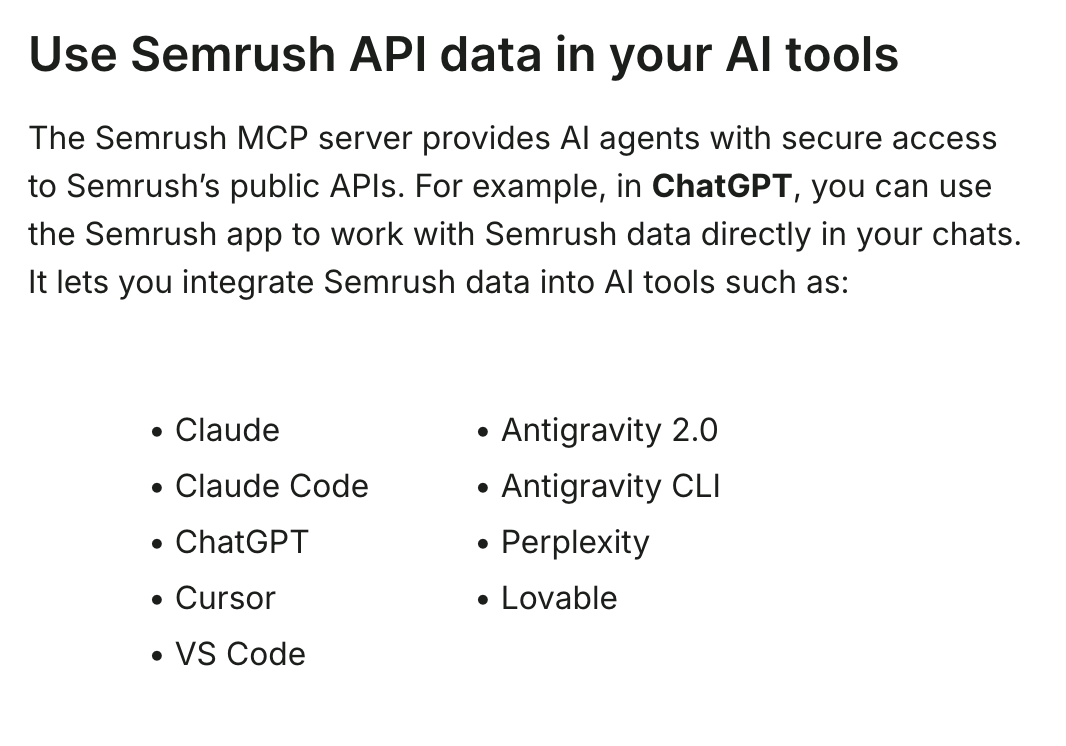
Many other AI platforms and tools support MCP as well, including N8N and Copilot Studio.
Dig deeper: WebMCP explained: Inside Chrome 146’s agent-ready web preview
The questions your marketing dashboards can’t easily answer

This is where MCP can earn its place in your workflow. The everyday stuff — what a page ranks for, how many backlinks it has — is easy to look up anywhere. The hard questions are the ones where the answer is hidden in the data, and you have to dig for it.
Here are the kinds of prompts I’ve used:
- “Using the Ahrefs MCP server, help me understand why this site is doing so well, especially in the last 12 months. Is it specific pages or keywords?”
- “Using Ahrefs data, can you tell which pages are new in the last six months and what their estimated traffic is?”
- “Compare the backlink profiles and growth trends for these five sites, and tell me which one is picking up referring domains the fastest and how.”
- “Across these 20 keywords in my niche, which sites rank most often and in the best positions?”
These are the questions that often come up in analysis work, such as competitor research and post-algorithm reviews. You can do this manually, but it takes hours of busywork to piece everything together.
MCP works across your marketing stack
Many marketing platforms now ship MCP servers, including Semrush, DataForSEO, Serpstat, Buffer, and VidIQ.
What you can pull depends on what each tool exposes through its API, but once it’s connected, all you have to do is ask it questions.

Google Analytics is one of the most useful MCP servers I’ve used. GA4 is powerful but hard to navigate. Half the time, you know the answer is in there, but don’t want to build another exploration report to find it.
The Google Analytics MCP server connects to the GA4 Data API, so you can just ask. A few examples:
- Diagnosing a drop:
- “Organic traffic fell about 20% last week. Which pages lost the most, and is it concentrated in a specific country or device type?”
- Finding the mismatch:
- “Which pages have high engagement time but a low conversion rate?”
- “Can you give me traffic for the last 30 minutes, by the minute?”
If you manage multiple accounts, you can run queries across several properties at once:
- “Across all my properties, what are their respective data retention settings (2 months vs. 14 months)?”
- “What is the combined traffic for [site 1] and [site 2] for the last week, broken down by Organic, Direct, and Referral?”
- “Which web data streams in my account do not have Enhanced Measurement enabled?”
One of my go-to uses for this MCP server is analyzing traffic after algorithm updates and trying to understand what the impact might be, such as which pages have declined or improved. I’ve also used it to review traffic across a client’s entire site to find opportunities for content refreshes and identify actual anomalies that stand out against normal fluctuations.
Querying the API directly also bypasses the 5,000-row export limit of the GA4 interface. The biggest drawback to the Analytics MCP is that it’s quite complicated to set up: it requires a Google Cloud project and an OAuth client.
Google Search Console MCP
Ahrefs gives you third-party estimates, and GA4 shows what people did after they landed. To complete the stack, add Google Search Console to get queries, impressions, clicks, CTR, and average position.
Google has an official GA4 MCP server, but not an official Search Console MCP server. Several community-built GSC MCP servers are available on GitHub. If you’re connecting to a client’s property, check what access the MCP server requests before installing it.
I use one from Suganthan Mohanadasan, which is open-source and lets you run the MCP server locally from your own computer. The setup is the same as the Google Cloud project and OAuth process for the GA4 MCP server, so set aside some time to get it going.
Once it’s connected, it handles the questions the Search Console interface makes difficult. Here are a couple of examples I like:
- “Give me a health check across my GSC properties.” One prompt covers every property at once, instead of opening each account to check.
- “What topics is [site] missing content for based on adjacent query data?” This has given me some excellent topics that don’t exist in my GSC account but are related to the query data.
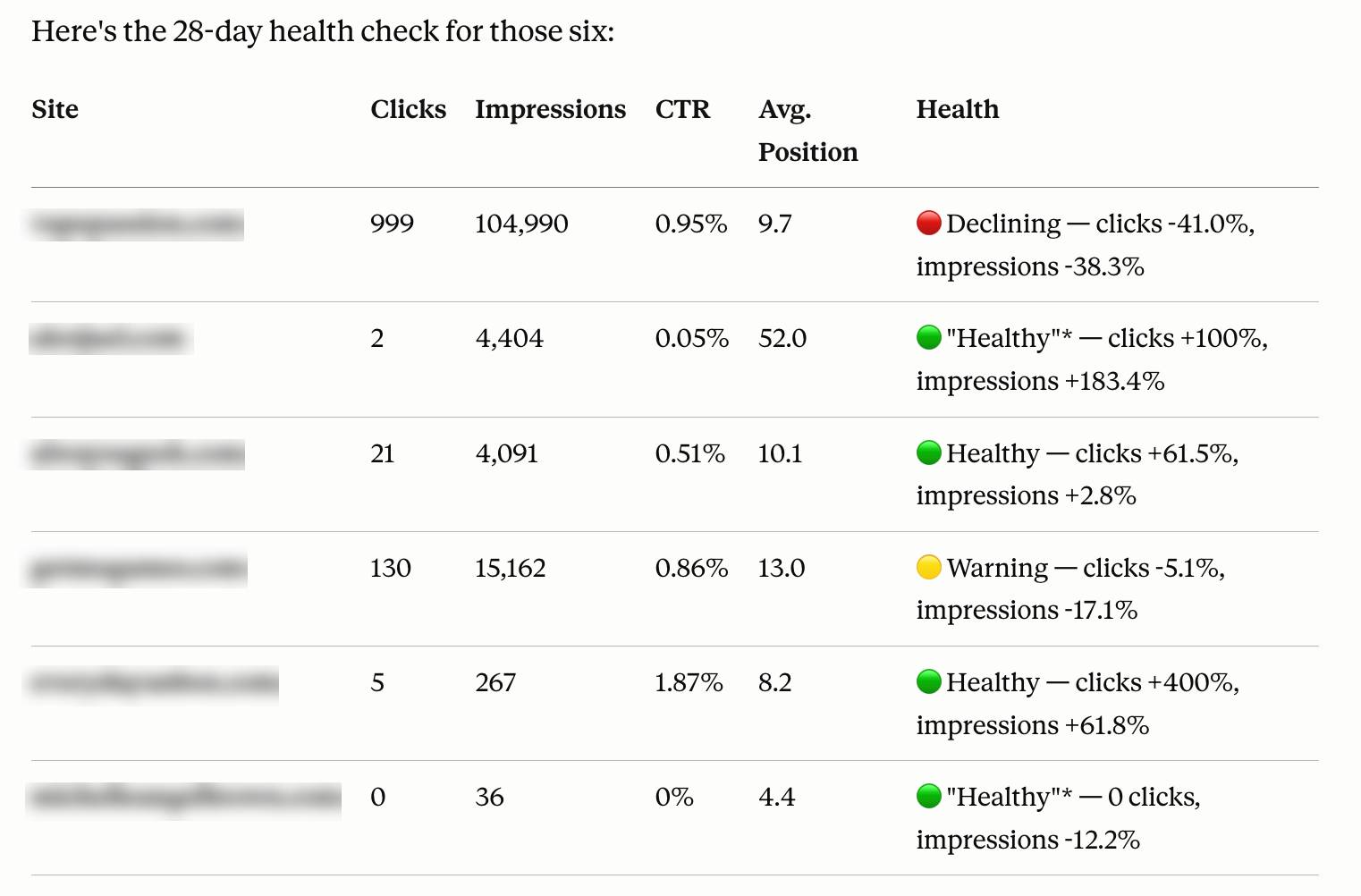
Like the other MCP servers I’ve talked about, the data is there, but MCP lets you get it out easily and in a way the GSC dashboard can’t.
Tracking how AI talks about your brand
If you care about GEO, MCP can also monitor your AI search visibility. Both Ahrefs and Semrush offer AI metrics accessible through their MCP servers.
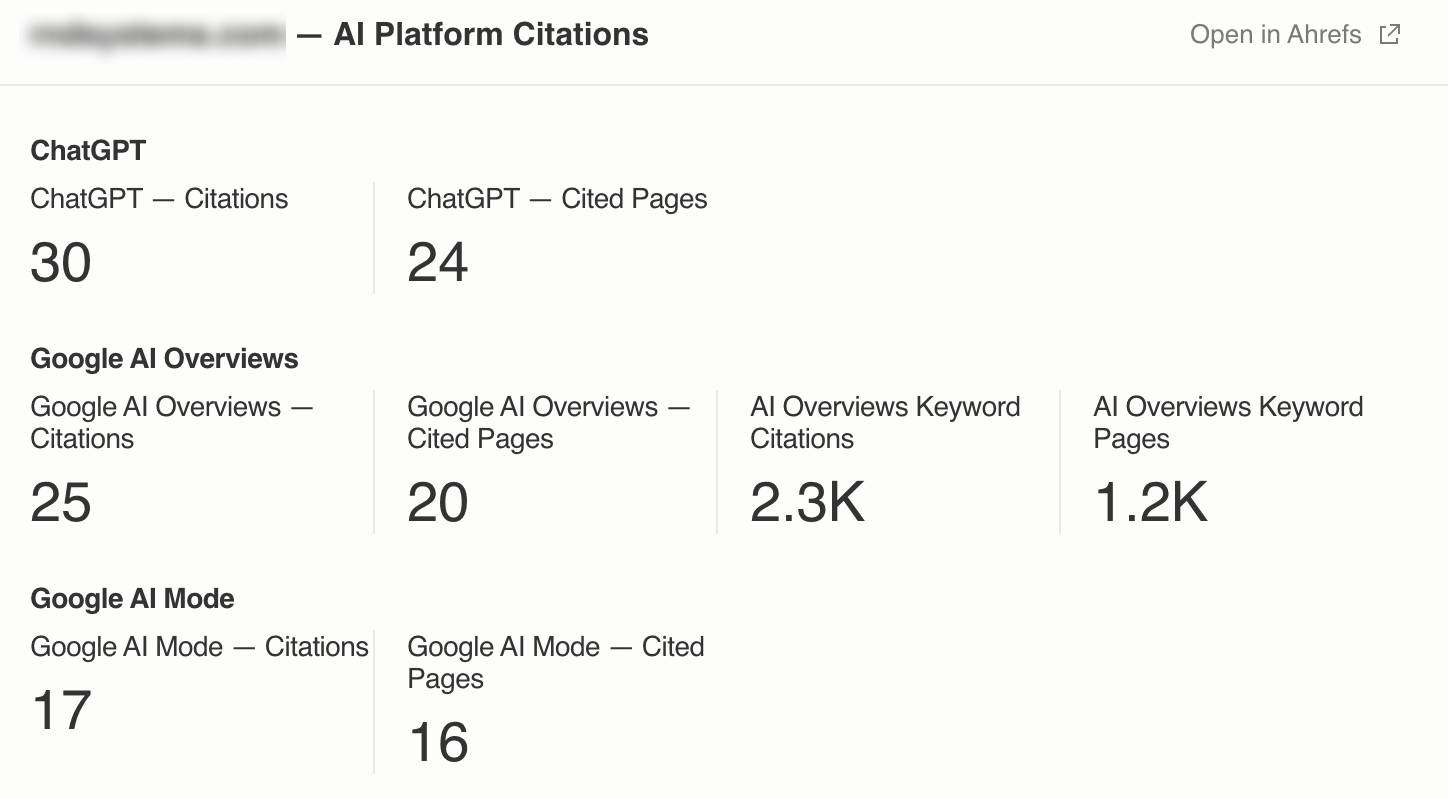
For example, Ahrefs’ Brand Radar (an expensive paid upgrade, unfortunately) tracks how brands appear in AI answers across major surfaces like Google’s AI Overviews and AI Mode, ChatGPT, Perplexity, Gemini, and Copilot. It tracks share of voice against competitors, shows brand mentions and citations, and identifies which pages and domains those platforms cite most in your space.
Semrush offers an MCP server that includes access to useful AI metrics, too. You can ask it to summarize where competitors are seeing shifts in AI traffic and how your site compares.
Many other AI tools are building MCP servers, too. For example, Waikay.io, an awesome AI brand monitoring tool from Dixon Jones, just released an MCP server for customers on Level 2 accounts.
Chaining tools and speeding up reporting
You can speed up analysis by connecting multiple sources. Because the AI holds context across tools, you can ask a question that would normally mean three logins and a spreadsheet to reconcile.
For example: Which blog posts lost traffic last month, what keywords do they rank for, and which are worth refreshing first? One source has the traffic, another has the rankings, and the assistant pulls both into a single answer.
Reporting is the obvious use. People wire up MCP servers through connectors like N8N and platforms like HubSpot to pull the week’s data, summarize it, and drop it into a doc or email on a schedule. You still want a human reading the output, but the grunt work of gathering and formatting becomes much easier.
Dig deeper: AI agents in SEO: A practical workflow walkthrough
What to know before using MCP
None of this is new to developers. Anyone comfortable with an API could pull and reshape this data long before MCP existed.
But the data is now more accessible, and we can ask LLMs questions about it. MCP exposes capabilities that lived behind code and makes them available to people with zero developer skills.
Even for developers, being able to talk to an LLM about the data can help them understand its meaning or inspire ideas they would never have come up with on their own.
A few limitations are worth knowing:
- These MCP servers run on the tool’s API, so big requests eat into your API credits and plan limits. Heavy queries add up.
- The AI only sees what the API exposes. If a data point isn’t available through the tool’s API, you can’t use it in analysis.
- Verify the output. The data is correct, but the AI can still misread it or oversimplify. Sanity-check anything you’ll act on or put in front of a client.
- Tell it to use the MCP. Assistants don’t always know whether to call the connected tool or just search the web, so I start prompts with “Using the Analytics MCP” to ensure the right route is taken.
- Be patient with big requests. A project spanning many keywords or several sites can take a while to come back and, depending on your LLM plan, may burn through credits and require daily pauses until they replenish.
Track your visibility across AI search, uncover missed opportunities, and grow your presence where customers are asking questions.
Where to start
Pick one tool you already pay for and one question its dashboard makes annoying. Connect the MCP server to your LLM of choice, ask, and compare the answer to doing it by hand.
That first query is likely to open your eyes to the possibilities. After that, you’ll see how many of your data-pull tasks are a single prompt away.
Topics on this page
If you liked the article, do not forget to share it with your friends. Follow us on Google News too, click on the star and choose us from your favorites.
If you want to read more like this article, you can visit our Technology category.