“#Microsoft now flags HOSTS files that block Windows 10 telemetry”
RECOMMENDED: Click here to fix Windows errors and optimize system performance
Actually, it is not big news. It is a well known fact that Windows 10 doesn’t use the HOSTS file to resolve addresses to certain Windows servers. The new thing is the changed behavior of Microsoft Defender.
The Hosts file is just a regular text file which can be modified using any text editor. The only catch is that the editor app should be started elevated (as Administrator). The hosts file is located in the system directory, so non-elevated apps will fail to save it.
The Hosts file consists of lines of text. Each line must include an IP address in the first text column followed by one or several host names. Text columns are separated from each other by white space. For a historical reason,
After you put Microsoft’s servers in the HOSTS file in order to get them resolved as, let’s say 127.0.0.1, i.e. to stop the OS accessing the actual servers, Microsoft Defender will prevent you from saving that file, and will display the following dialog.
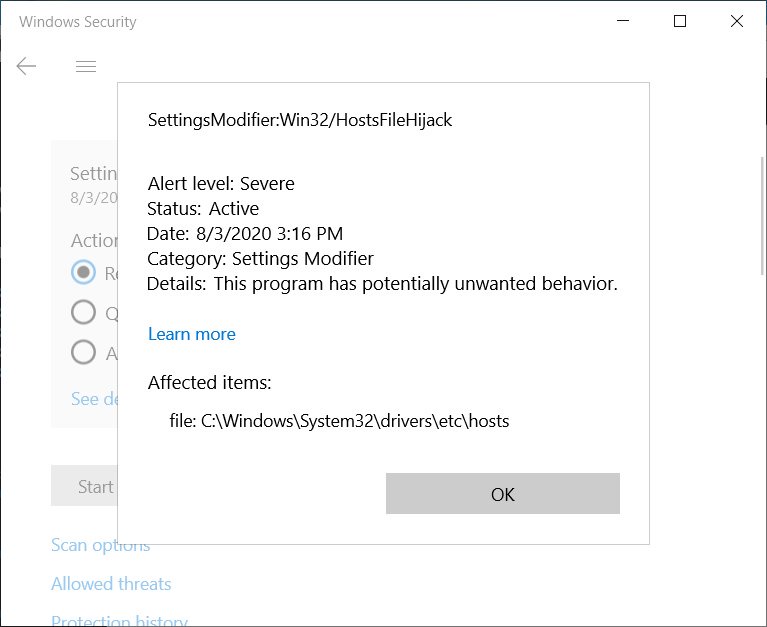
Notice SettingsModifier:Win32/HostsFileHijack, it is a new, dedicated category for the modified file. It seems that Microsoft had recently updated their Microsoft Defender definitions to detect when their servers were added to the HOSTS file.
As BleepingComputer reports, the following lines in HOSTS will trigger detection:
www.microsoft.com
microsoft.com
telemetry.microsoft.com
wns.notify.windows.com.akadns.net
v10-win.vortex.data.microsoft.com.akadns.net
us.vortex-win.data.microsoft.com
us-v10.events.data.microsoft.com
urs.microsoft.com.nsatc.net
watson.telemetry.microsoft.com
watson.ppe.telemetry.microsoft.com
vsgallery.com
watson.live.com
watson.microsoft.com
telemetry.remoteapp.windowsazure.com
telemetry.urs.microsoft.com
If you decide to clean this threat, Microsoft will restore the HOSTS file back to its default contents.
Well, modifying the HOSTS file can be a bad idea if it is done in an improper way, or has been done by malware. However, for users who actually know what they are doing, it is just another restriction that leaves even less control of the OS in users’ hands.
RECOMMENDED: Click here to fix Windows errors and optimize system performance
If you want to read more like this article, you can visit our Technology category.
if you want to watch Movies or Tv Shows go to Dizi.BuradaBiliyorum.Com for forums sites go to Forum.BuradaBiliyorum.Com